 Add Qreate in ChatGPT
1
Read the real server.
Channels, roles, permissions and module settings, from Discord, not from the model's memory. "What do I have, and what is messy?" is a fair first question.
Qreate is a Discord MCP server you do not have to host. Add one address to ChatGPT, Claude, Cursor, VS Code or any other MCP client, sign in with Discord, and that app can read your real server, plan a change, show you the result and apply it after you say yes.
There is no bot token to copy and no script to run. The bot in your server is Qreate's, and your AI app never sees its key.
Sign in with Discord. Review the plan. Approve before anything changes.

First, I show you what will change.
Choose how you want to connect. Use ChatGPT, Claude or your terminal, review the plan, and approve before anything changes.
Manage your Discord server from ChatGPT with the Qreate plugin for ChatGPT. Ask ChatGPT to inspect channels, prepare welcome posts, or configure roles using conversational ChatGPT apps. Review proposed plans in visual preview cards and approve every change before it reaches your server.
Add Qreate in ChatGPT“@Qreate inspect #welcome and draft a rules announcement with buttons”
Manage your Discord server from Claude with the Qreate connector. Plan role structures, draft rich announcements, and inspect server settings in natural conversation. Claude drafts exact changes for your review, and Qreate executes the plan only after your approval.
Open in Claude“Review my Discord server structure and propose a clean role hierarchy”
Run Discord MCP operations straight from your terminal with Claude Code. Inspect channels, check permission mismatches, and automate community setups without leaving your CLI workflow. Every terminal command produces a structured plan for your confirmation before anything applies.
claude mcp add --transport http qreate https://mcp.qreate.gg/mcp“Check channel permissions on my Discord server and list inactive roles”
Connect your Discord server to Cursor through remote MCP configuration. Use your editor to inspect community structure, organize channel topics, and draft role hierarchies. Review changes directly in your workflow with safe approval gates before updates reach Discord.
{"mcpServers":{"qreate":{"url":"https://mcp.qreate.gg/mcp"}}}“Check current Discord moderation settings and draft a verification step”
Connect VS Code with GitHub Copilot to your Discord server using Model Context Protocol. Ask Copilot to inspect server structure, draft channel configurations, and build event schedules. Changes stay bounded to servers you administer, with previews and approval on every step.
{"servers":{"qreate":{"type":"http","url":"https://mcp.qreate.gg/mcp"}}}“List all channels in my Discord server and prepare a tournament event schedule”
Connect autonomous agents and desktop tools like Devin Desktop to your Discord server over Streamable HTTP and OAuth. Let your AI agent read server context, propose workflows, and prepare message drafts with live previews. You remain in control at every stage, confirming stored plans before anything applies to your community.
https://mcp.qreate.gg/mcp“Create a ticket system layout for our support team with escalation roles”
You need a Qreate account (signing in with Discord creates it) and a Discord server you administer. Add the Qreate bot to that server first. Then connect your AI app. If you connect first, the chat will ask you to add the bot and carry on when you say done.
Qreate checks your access to the server on every request. Your AI app only gets the connection you approve.
Use the connection steps for ChatGPT, Claude, Cursor, VS Code or Claude Code.
A clear plan before anything changes. Connect once. Ask in plain words. See what Qreate will do, then decide.
Add https://mcp.qreate.gg/mcp to your AI app.
Sign in with Discord. A consent screen names the app and lists the servers it would reach.
Ask for what you want in plain words: "set up my server for a Friday tournament".
Qreate reads the real channels, roles and settings, then shows the plan as numbered steps with the crew, channels and roles each step touches.
You say yes. Qreate applies exactly that plan and reports what went through.
Everything below is live. Qreate gives your AI app a current view of your server and a way to prepare changes for you to review.
Channels, roles, permissions and module settings, from Discord, not from the model's memory. "What do I have, and what is messy?" is a fair first question.
You describe the outcome, or ask for one naming style across what you already have. Qreate shows each rename as old name next to new, and builds big setups in short stages you approve one by one.
Each step names the crew, module, channel, role or time it touches. The last line says what Apply will do.
The plan you saw is stored on Qreate's side and applying refers to that stored plan. If the server changed since, or a newer plan exists, the old one is refused and you ask again.
Undo. A batch that was applied can be put back.
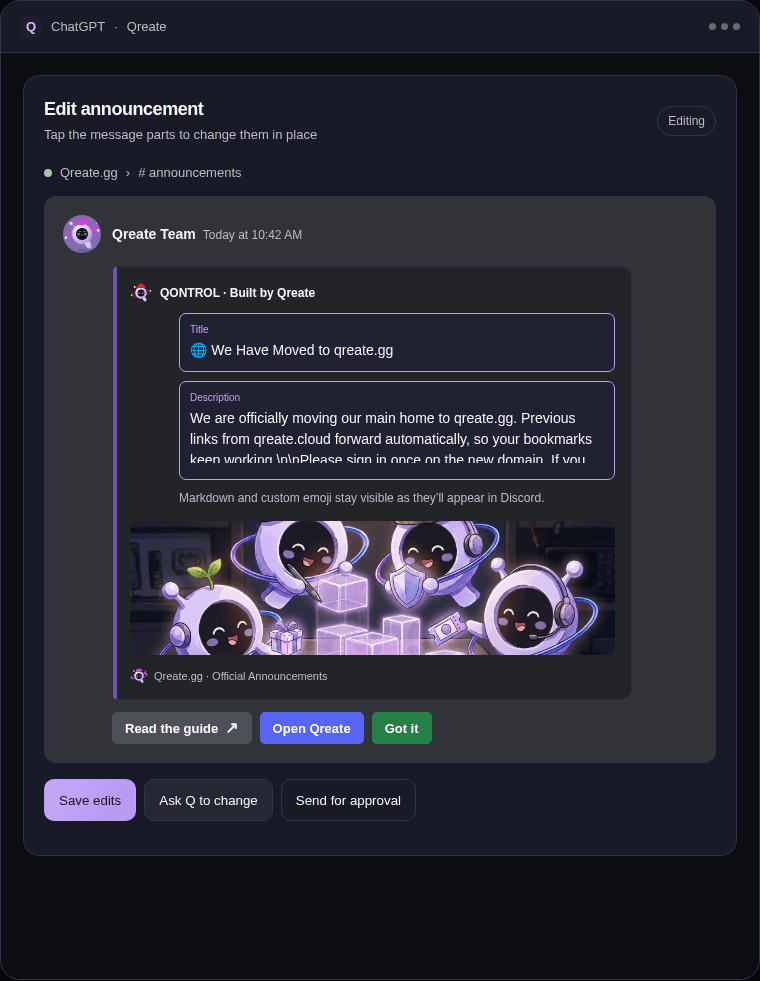
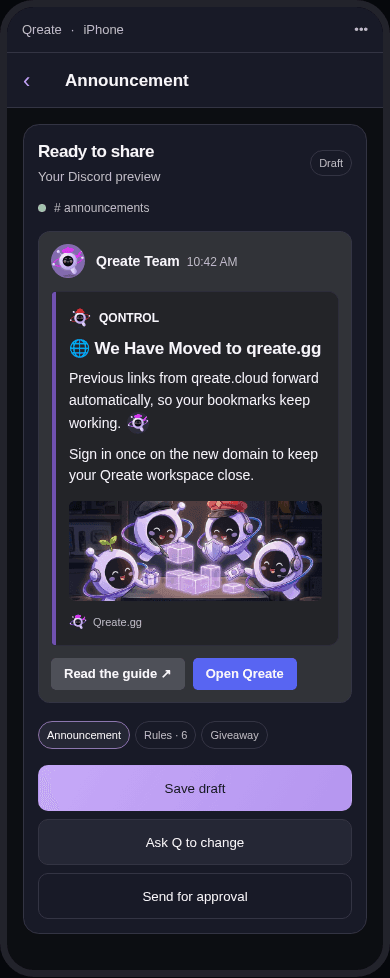
Text above the embed (where a ping has to go, because a ping inside an embed notifies nobody), a full embed with a banner, author and footer, and up to five link buttons. Drafted and shown first, posted after your yes, exactly as shown.
Better post formats. Giveaway, level-up, feed post, changelog and welcome with a banner.
Edit the message itself, save the draft, and ask Qreate to post after you approve it.
Save a picture from the chat or a link into the server's asset library and use it in posts and panels. Your AI app can make a picture with its own tools, or you can bring one, and Qreate saves it.
Ask for your balance and when it resets. Planning roles, channels and renames costs no Qreate credits, and your AI app's own usage is covered by your ChatGPT or Claude plan. When you are out, the chat says so and points to your usage page and the Top.gg vote link.
Recipes and Workshop scenarios. Ready-made setups, planned against your actual server so the names fit what you have.
Ready starting prompts. Clients that show them offer "Set up my server", "Run a giveaway" and "Find what's broken on my server".
A client that leads. Qreate asks the AI to ask you one question about your server and to suggest two or three ideas that Qreate really supports. You do not have to know the vocabulary.
Modules. Welcome and join roles, verification, tickets, moderation tools and logging, leveling, giveaways, events and reminders, reaction roles, feeds, custom commands and the Q Hub challenges.
Onboarding for a new connection. If you connect before adding the bot, the chat gives you the add-bot link and carries on when you say done. Three clicks in Discord.
Simple prompts can start a message draft, a numbered setup or a quick account answer.
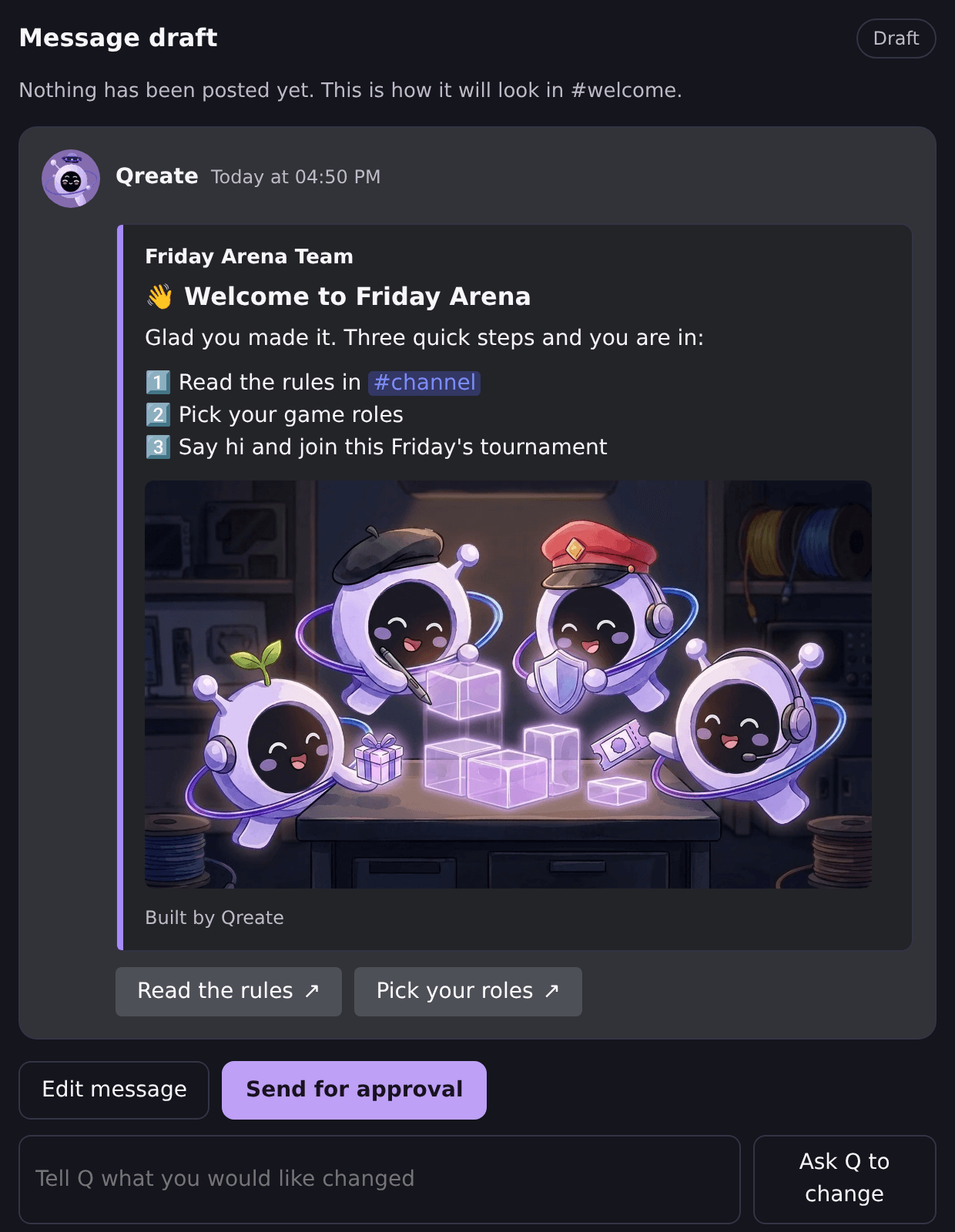
"Make a welcome for #welcome with my banner"
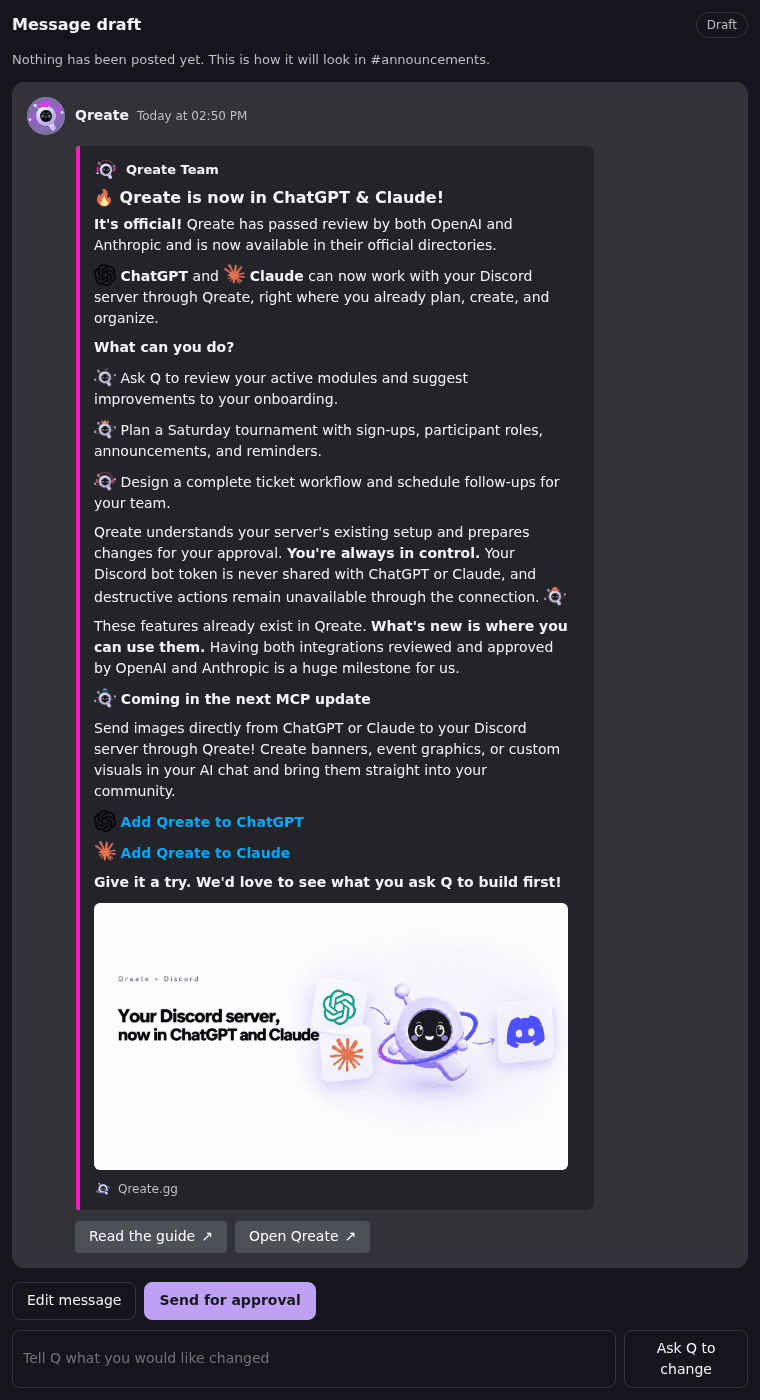
Qreate shows the message as Discord will render it.The banner, text, footer and buttons are ready for your review. Edit in place, then approve the post.
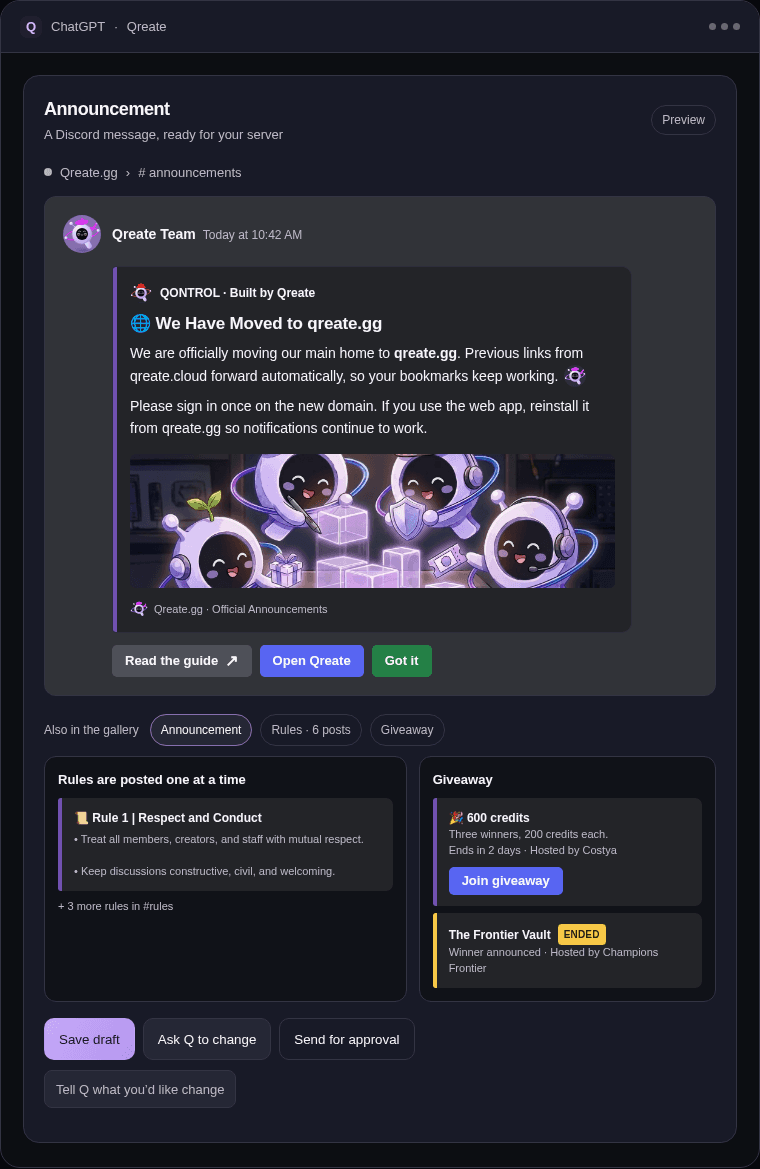
"Run a giveaway in #giveaways, 3 winners, ends Friday"
A numbered plan, ready to check.Review the channel, winners and end time before you say yes.
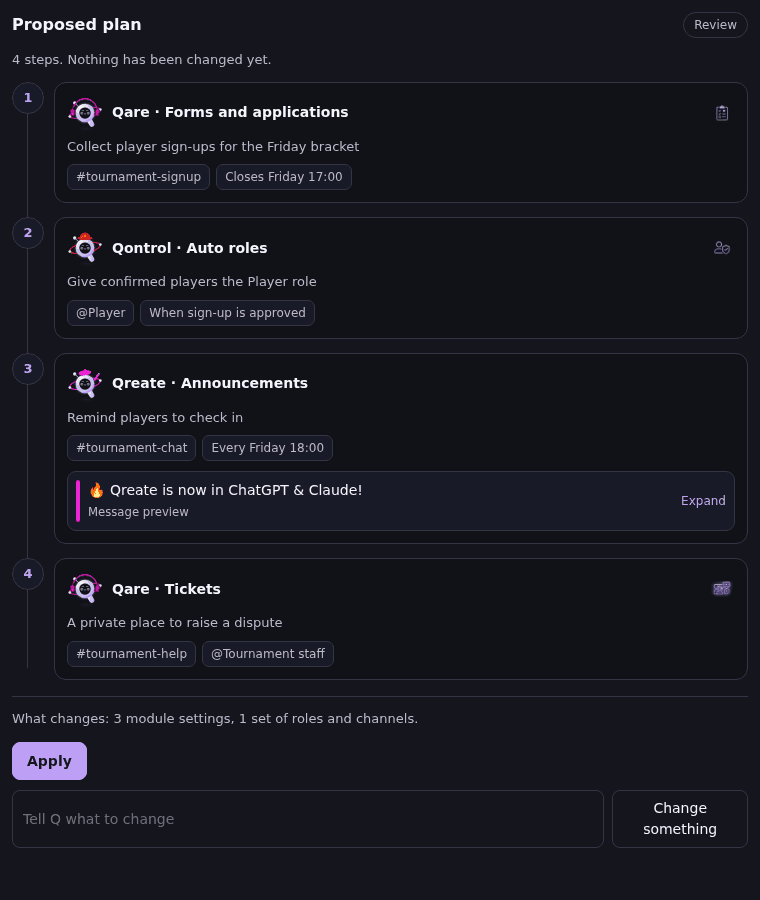
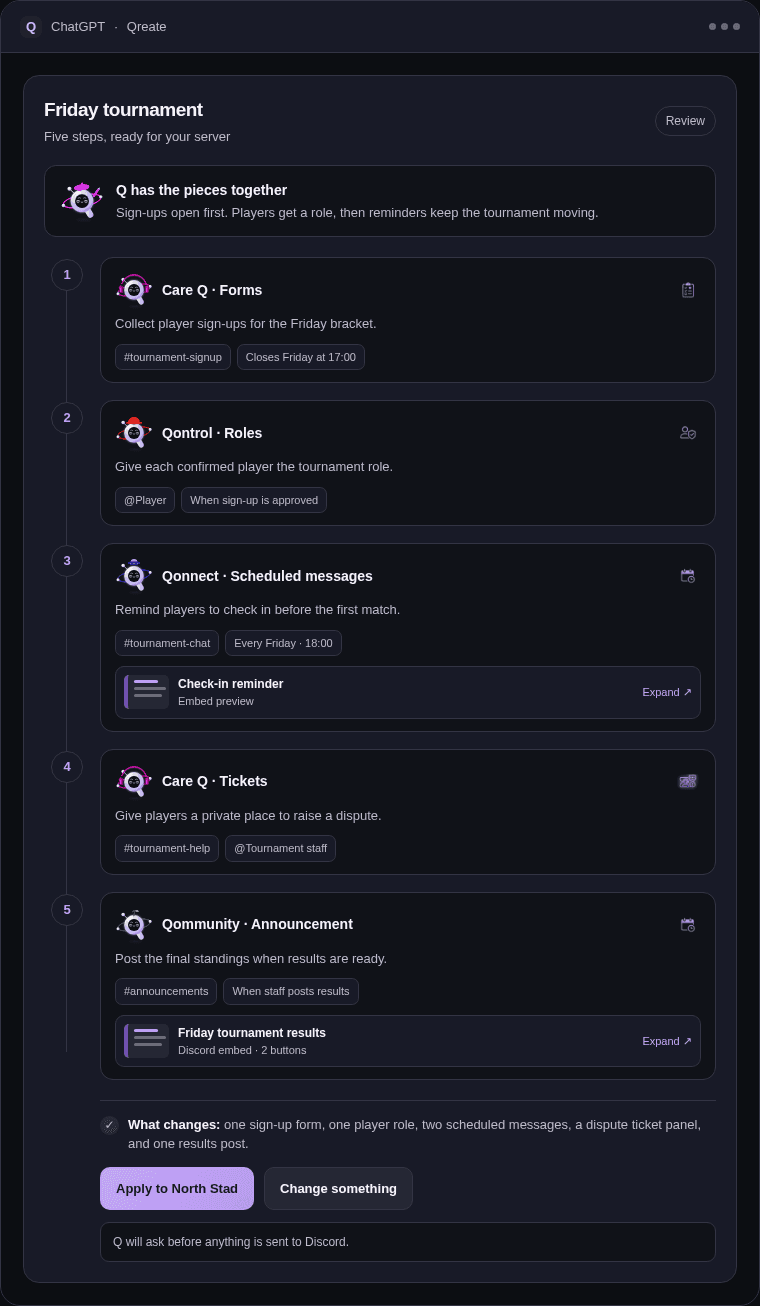
"Set up a Friday tournament with sign-ups, a player role and reminders"
A setup shaped around your server.Qreate names the roles, channels and modules it proposes to change.
"How many Qreate credits do I have?"
A direct answer from Qreate.Ask for your balance and when it resets.
Your Qreate creditsYou have 240 credits left. They reset on November 12.
The preview keeps the details in view, so you can judge the message or setup before anything reaches Discord.
The preview has the author, the embed colour edge, the banner, the footer and the button row, in the order and proportions your members will see. Edit the title or text on the message itself, then ask Qreate to post it.
Each step shows who on the Q crew does it, the module, and the channel, role or time it touches. The last line says what Apply will do.
Change the message where you see it. The preview updates before you ask Qreate to send the draft for approval.
The open-source Discord MCP servers ask you to create a bot, copy its token and run a server yourself. Whatever the AI decides to call, it can do with that token. Qreate works the other way round.
The connection stays scoped to servers you administer. Qreate shows the plan or message first and waits for your approval.
Connect Qreate to the AI app you already use. Each client has a short setup guide.
Start with the result you want. Qreate can help turn it into steps.
More ideas on AI Discord server builder and Discord automation.
A discord mcp server connects language models to community infrastructure without compromising administrative boundaries. Through the Model Context Protocol, any compatible desktop client or web environment communicates with your Discord community using a single hosted endpoint. Rather than letting models issue arbitrary API calls against your community, Qreate establishes a disciplined workflow where every action starts with an inspection, advances through a structured plan, and waits for your explicit confirmation before anything touches Discord.
When you manage discord with chatgpt, conversational prompts turn into concrete server architecture. Using the Qreate plugin for ChatGPT alongside modern ChatGPT apps, you can describe channel reorganizations, new role ladders, or event announcements in plain language. ChatGPT calls Qreate to read server state directly from Discord, verifying existing roles, permissions, and channel categories. It then returns a plan with a visual preview. For announcements, message drafts appear exactly as Discord renders them, including embeds, banners, and button rows, complete with helpful offers of what a post is missing before publication. If you need custom visuals, pictures saved to the asset library can be placed into posts or headers. When satisfied, you confirm the proposal, knowing that applying refers strictly to the stored plan you inspected.
Connecting through the claude discord connector or working in your terminal with Claude Code creates an efficient environment for maintaining complex servers. In Claude, you can audit permissions, design verification gates, and structure entire community layouts. With Claude Code, developers and server owners run terminal commands to inspect channels, analyze permission discrepancies, and test setup recipes without leaving their shell. In both interfaces, the model never acts on its own. It reads live context, drafts a numbered sequence of steps, and shows you the exact outcome. Once approved, the changes take effect immediately, with a full undo capability available if you ever want to roll back a recent batch.
For creators and developers who keep their community documentation alongside their codebases, configuring mcp for discord inside Cursor and VS Code bridges server administration with developer workflows. By adding the endpoint to your local editor configuration, GitHub Copilot and Cursor can query active server layouts, audit channel permissions, and prepare configuration updates. You can reference internal community guidelines or event schedules in your workspace, and ask the editor to draft corresponding Discord roles and channels. Every proposed change generates a structured preview card, giving administrators total oversight before anything commits to the server.
Any modern discord ai agent communicating over Streamable HTTP with OAuth can integrate with your Discord server through Qreate. Whether using tools like Devin Desktop or dedicated agent runners, agents can explore community structure, check credit balances, and load pre-configured Workshop scenarios for game nights, ticket desks, or onboarding flows. The AI never possesses autonomous execution privileges. The workflow remains strictly governed: the AI proposes, the person approves. If credits run low, your agent can report your current balance and reset date so operations remain predictable.
Most traditional Discord MCP implementations ask you to generate a bot in the Discord developer portal, copy its secret bot token, and paste that token into a local script. That model presents major operational risks: whoever holds the token can issue destructive requests across any server where the bot has presence, bypassing permission checks and audit trails. Qreate avoids this entirely. There is no bot token to create, copy, or expose. Instead, you sign in with Discord via scoped OAuth. Access is checked on every single request and remains strictly restricted to servers you administer. Destructive operations like deleting channels or banning members are completely absent from the MCP protocol. Your server remains protected, changes are verified before execution, and you maintain complete authority over every ai discord server setup.
Answers about setup, approvals and access.
An MCP server is an address an AI app can connect to so it can use outside tools. A Discord MCP server lets the AI work with a Discord server. Qreate's lives at https://mcp.qreate.gg/mcp and is hosted by us.
No. You add the Qreate bot to your server the usual way and sign in with Discord. The token stays with Qreate and is never shared with the AI app.
ChatGPT, Claude, Claude Code, Cursor, VS Code with GitHub Copilot, and any client that supports remote MCP servers over Streamable HTTP with OAuth.
No. Planning only produces a proposal. Applying needs your yes, and applies the stored plan you were shown. Posting a message is a separate draft you approve.
No. Those actions are not available over MCP. They stay in the dashboard, where you press the button.
Only servers you administer, only while the connection lasts. Qreate checks this on every request, whatever the AI types.
Yes. Ask the AI to undo what Qreate just changed. A batch that was applied is put back after you confirm.
Open your Qreate account, find the connected client and revoke it. It stops working immediately. Changes already applied stay as they are.
Sign in with Discord, review the plan, and approve before anything changes.
Read the Qreate MCP guide